Digital
Digital inputs are buttons, switches, and other binary (on/off) controls on your Yaeltex controller. This section covers how to configure their MIDI output messages and LED feedback behavior.
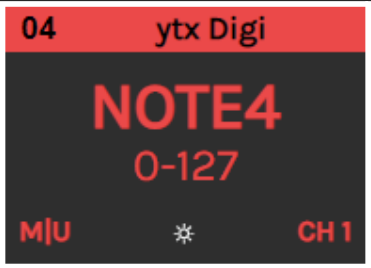
Digital Output Configuration
Section titled “Digital Output Configuration”Configure what MIDI messages your digital inputs send when pressed and released.
Momentary / Toggle
Section titled “Momentary / Toggle”Set the digital input as Momentary or Toggle:
| Mode | Behavior |
|---|---|
| Momentary | Sends message on press AND release. ON message when pressed, OFF message when released. |
| Toggle | Changes state with each press. First press sends ON, second press sends OFF. |
Example with NOTE message:
- Momentary: Sends NOTE ON with MAX velocity when pressed, NOTE OFF with MIN velocity when released
- Toggle: Sends NOTE ON with MAX velocity on first press, NOTE OFF with MIN velocity on second press
Message Type
Section titled “Message Type”Set the type of MIDI message sent when actuating the button:
| Type | Description |
|---|---|
| NOTE | Send Note On when pressed (ON), Note Off when released (OFF). Velocity is set by MIN/MAX values. If either value is 0, a Note Off message is sent. |
| CC | Send a Control Change message. Value is MAX when ON, MIN when OFF. |
| Program Change # | Send a specific Program Change number every time the button is pressed |
| PC+ | Increase Program Change number and send |
| PC- | Decrease Program Change number and send |
| NRPN | Send a Non Registered Parameter Number (14-bit) |
| RPN | Send a Registered Parameter Number (14-bit) |
| PB | Send a Pitch Bend message (14-bit) |
| Keystroke | Send a keyboard event (HID) |
MIDI Channel
Section titled “MIDI Channel”Set the MIDI channel (1-16) to send your message.
MIDI Port
Section titled “MIDI Port”Set where the message is sent:
| Port | Description |
|---|---|
| USB | Send only via USB |
| MIDI | Send only via DIN5 MIDI port |
| USB+MIDI | Send via both ports simultaneously |
Parameter / Key
Section titled “Parameter / Key”Set the parameter to be sent:
- For NOTE/CC/PC: 0-127 (7-bit)
- For NRPN/RPN/PB: 0-16383 (14-bit)
- For Keystroke: The key or ASCII code to send
Minimum (OFF) Value
Section titled “Minimum (OFF) Value”Set the value sent for the OFF state. The MIDI range starts at 0.
Maximum (ON) Value
Section titled “Maximum (ON) Value”Set the value sent for the ON state:
- 7-bit messages (Note, CC, PC): Maximum is 127
- 14-bit messages (NRPN, RPN, PB): Maximum is 16383
Input Comment
Section titled “Input Comment”Type a descriptive comment for later reference. This appears on the component’s card to help you identify controls in your configuration.
Digital Feedback
Section titled “Digital Feedback”Configure how the LED responds to incoming MIDI messages.
Source Port
Section titled “Source Port”Set which ports the feedback listens to for incoming MIDI messages:
| Port | Description |
|---|---|
| Local | Update feedback locally with component action |
| USB | React to messages received via USB |
| MIDI | React to messages received via DIN5 MIDI port |
You can combine ports as needed. The default is USB + MIDI.
Message Type
Section titled “Message Type”Set the MIDI message type the feedback responds to:
- Note On/Off
- Control Change
- Program Change
- NRPN
- RPN
- Pitch Bend
MIDI Channel
Section titled “MIDI Channel”Set the MIDI channel (1-16) the feedback responds to. Usually this should match the output configuration.
MIDI Parameter
Section titled “MIDI Parameter”Set the MIDI parameter the feedback responds to. Typically matches the output parameter.
| Message Type | Value Range |
|---|---|
| Note / CC / PC | 0-127 |
| NRPN / RPN / PB | 0-16383 |
Color Mode
Section titled “Color Mode”Choose how the LED color behaves:
Fixed Color
Section titled “Fixed Color”Set a specific color for the LED feedback. You can:
- Use the color picker
- Enter a HEX value in
#RRGGBBformat
In Fixed Color mode, you can choose two OFF state options:
| Option | Behavior |
|---|---|
| LED OFF | LED turns completely off when MIN value is received |
| LOW INTENSITY | LED dims to low brightness when MIN value is received, indicating inactive state |
Value to Color
Section titled “Value to Color”The LED color is determined by the received MIDI value, selecting from 128 available colors.
Refer to the Value to Color table in the manual to see which MIDI values correspond to which colors.
Value to Intensity
Section titled “Value to Intensity”Available in firmware v0.20 and later
Adjust the LED brightness dynamically by sending MIDI messages on the channel selected for Value to Intensity in the Controller Options.
- Message type is configured per button in the feedback settings
- Note velocity or CC value sets brightness from 0 (minimum brightness, not off) to 127 (maximum brightness)
Quick Reference
Section titled “Quick Reference”Output Configuration Summary
Section titled “Output Configuration Summary”| Parameter | Options | Description |
|---|---|---|
| Mode | Momentary / Toggle | How button state changes |
| Message Type | NOTE, CC, PC, PC+, PC-, NRPN, RPN, PB, Keystroke | MIDI message type |
| MIDI Channel | 1-16 | Channel for output messages |
| MIDI Port | USB, MIDI, USB+MIDI | Where messages are sent |
| Parameter | 0-127 or 0-16383 | MIDI parameter number |
| Min Value | 0+ | OFF state value |
| Max Value | up to 127 or 16383 | ON state value |
Feedback Configuration Summary
Section titled “Feedback Configuration Summary”| Parameter | Options | Description |
|---|---|---|
| Source Port | Local, USB, MIDI | Where feedback listens |
| Message Type | Note, CC, PC, NRPN, RPN, PB | Message type to respond to |
| MIDI Channel | 1-16 | Channel to listen on |
| Parameter | 0-127 or 0-16383 | Parameter to respond to |
| Color Mode | Fixed / Value to Color | How LED color is determined |
Related
Section titled “Related”- Encoders - Configure rotary encoder components
- Analog - Configure faders, pots, and other analog inputs
- Controller Options - Configure MIDI channels for special features